Product Filter
Category
- Sets(1452)
- LEGO Parts(1478)
- LEGO Wear(1293)
- LEGO Books(153)
- LEGO Bags(45)
- Extras(842)
LEGO Theme
- (2227)
- ART(13)
- Animal Crossing(16)
- Architecture(14)
- Batman(195)
- More
Price
- Under €5(854)
- Under €10(2160)
- Under €20(3664)
- Under €30(4266)
- Under €40(4521)
- More
Brand
- LEGO(3878)
- LEGO Education(1)
- LEGOwear(1288)
- BRICKshop(12)
- Duracell(3)
- More
Age
- from 0½ years(12)
- from 1 years(9)
- from 1½ years(48)
- from 2 years(111)
- from 3 years(279)
- More
Gender
- Boy(983)
- Girl(285)
- Boy/Girl(2242)
Special
- Exclusive(148)
- Hard to Find(852)
- Lego Special(236)
- Free!(5)
- New!(350)
Special day
- All Options
Discount
- All Options
Reviews
- All Options
Stock
- All Options
Year
- All Options







 Delete cookies
 Monday, 13 February 2017 09:56 | Last Updated on Monday, 13 February 2017 10:03 |
  Written by A. de Goeij
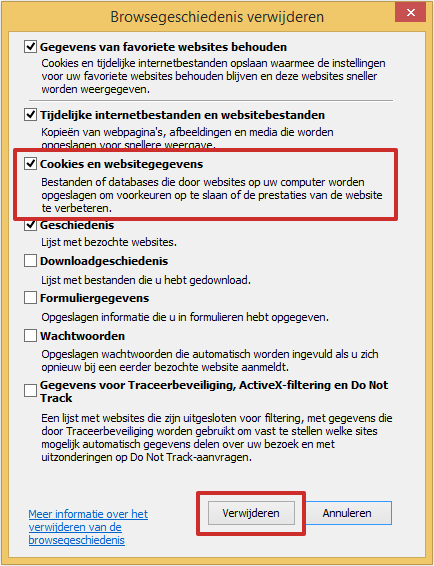
Delete cookies in Internet Explorer 9, 10 en 11
- Open Internet Explorer.
- Klik the icon 'Extra'. Dit icon looks like a gearing wheel
 .
. - Klik Security > Clear Browsing Data.
- You can now opt to delete cookies.
- Place a checkmark before Cookies and website details when this box has not been checked yet.
- Click Delete.
Delete cookies in Edge
- Click the icon that looks like three dots in the right top corner of your screen
 .
. - Click Settings and Choose what to delete in the newly arising menu.
- Some default setting options will be checked in the 'Clear Browsing Details'-menu. Do not uncheck the box for 'Cookies and saved website details'. Instead, uncheck the boxes for the other options.
- Cllick Delete.
- Your cookies will be cleared. Click somewhere on your webscreen outside the settings menu to leave Settings.
Delete cookies in Google Chrome
- Open Google Chrome.
- Click the icon 'Manage Google Chrome '.This icon looks like the following three stripes
 .
. - Click More assistance > Clear Browsing Data.
- Google Chrome automatically opens a new window. Check the box Cookies and other site data.
- Select the time range which allows you to choose from which date onwards you want your cookies to be deleted.
- Click Clear Browsing Data
Delete cookies in Firefox
- Open Firefox.
- Click the following icon in the top right of the screen
 .
. - Click Opties.
- The window 'Privacy' will be opened in a new window automatically. In case this does not happen, click the Privacy option.
- Click 'Firefox will' in the popup screen and click Use advance settings for browser history.
- You can now choose more options. Click the button Show cookies.
- Click Delete all cookies.
- Click Close to delete the window.
Delete cookies in Mac
- Open Safari
- Click left in the menu bar of Safari.
- Click Preferences
- Click Privacy.
- Check the box behind Cookies and website details and click Delete all cookies.
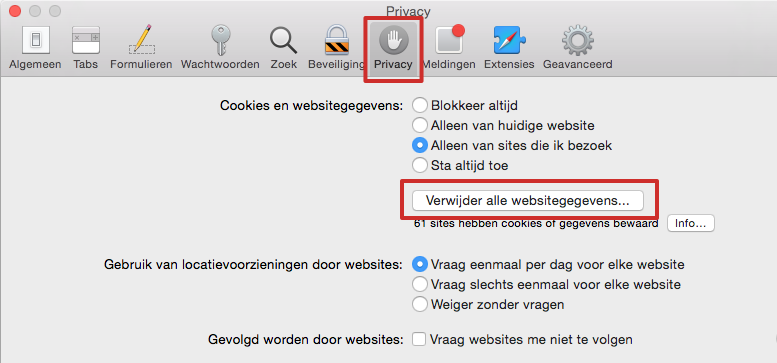
- A window will pop up to ask you again whether you want to delete all details saved by websites.
- Click Delete now.
Delete cookies in iOS 8 and 9 (iPhone)
- Click Settings > Safari.
- Click Clear Browsing History and Website Data
- Click Clear History and Data
Delete cookies in iOS 8 and 9 (iPad)
-
- Click Settings > Safari.
- Click Clear Browsing History and Website Data
- Click Clear
Delete cookies on the Samsung Galaxy Tab
- Open Internet.
- Click the icon to go to Settings. Dependent on the tablet this icon will either be a button left to the Power Button or you click on the icon that looks like three little blocks.
- Click Settings > Privacy (Samsung Galaxy Tab 4) or Privacy and Security (Samsung Galaxy Tab 3).
- Click Clear Browsing Data (Tab 4) or Delete all cookies > OK (Tab 3).
- In the newly popped up window, check the boxes behind the data you wish to delete. Check the box Cookies and website data to delete cookies.(Tab 4).
- Click Clear (Tab 4).


 Mega assortment Wrapped with care Quick shipment Free products Super Deals Safe & Reliable Click & Collect




Quick turnover, really speedy delivery. Well packaged very pleased with the service all round will use again.
Great communication. Shipped and received quickly. Christmas saved as I couldn't source these items in local shops. Thank!
Very fast shipment and it was delivered on the day it had been promised to arrive.
Very impressed with the service . Product arrived within a few days. I would recommend this company highly
Superb company. The website is a breeze to navigate and select from. Ordering is simple and, once ordered, you receive regular updates as to the status if your order. So impressed I have made 4 more purchases this week.
From: Steve Fearn
Rating:
Great communication. Shipped and received quickly. Christmas saved as I couldn't source these items in local shops. Thank!
From: Tracy Duff
Rating:
Very fast shipment and it was delivered on the day it had been promised to arrive.
From: Maxim Dolgobrod
Rating:
Very impressed with the service . Product arrived within a few days. I would recommend this company highly
From: Gemma dermody
Rating:
Superb company. The website is a breeze to navigate and select from. Ordering is simple and, once ordered, you receive regular updates as to the status if your order. So impressed I have made 4 more purchases this week.
From: Ayden Oliver Wilson
Rating: